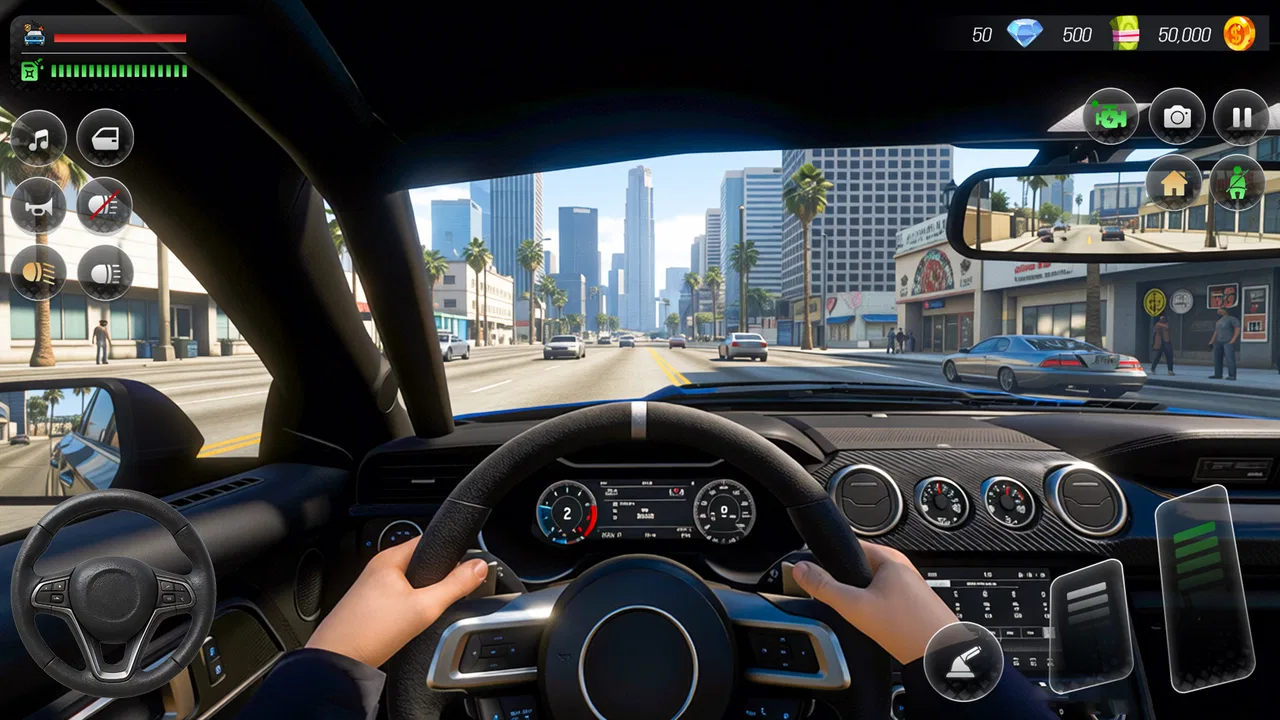
US Car Drive Simulator offline
- 2.8
- Rating
- 5.00M
- Installs
- Free
- Price

 Analysis by App-foxy
I spent time with US Car Drive Simulator offline to see whether its promise of quick driving missions holds up beyond a short first session. It is a free strategy game built around car driving, and its most useful quality is convenience: it can be played without an internet connection, making it an easy choice for a commute, a waiting room, or a few quiet minutes at home. The experience is straightforward rather than deeply layered, so I approached it less like a long-term racing simulator and more like a compact driving game where repeatable habits matter.
The first thing I noticed is that the game asks for a particular kind of player. If you want a detailed driving model, a large vehicle collection, competitive online races, or a carefully structured career, this is probably not the best match. If you prefer short sessions and the ability to start driving without relying on a connection, it has a clearer appeal. I found the game most enjoyable when I treated each mission as a small exercise in control and route awareness instead of expecting a full console-style simulation.
How the driving loop feels in everyday play
The basic workflow is simple: open the game, choose a driving activity, and focus on completing the mission cleanly. That simplicity is helpful because there is little preparation between sessions. I could pick it up after a break without needing to remember a complicated upgrade tree or a multiplayer schedule. The offline design also makes it practical for places where mobile data is unreliable, although it is still sensible to launch it once before travelling so the installation and current game state are ready.
You May Also Like

 Blood Strike: 2.5 Anniversary
Blood Strike’s Loadouts Turn Every Drop Into a Tactical Gamble
A close look at Blood Strike’s custom loadouts: how fast access to signature weapons reshapes its battle royale rhythm, rewards preparation, and narrows the gap between fights.

 Pandora - Music & Podcasts
Pandora’s Music Is Easy to Start, but Harder to Recover
Pandora’s strength is its low-effort path from a seed to a station. Its weak spot is how much confidence it asks you to place in connection, setup, and quiet recovery.

 8 Ball Pool
 Is Built on Rivalries, Rematches, and Routine
A close look at the rivalries, rematches, shared routines, and unanswered safety questions that turn a quick pool match into a persistent mobile community.

 Samsung Music
’s Quiet Strength Is Playing What You Already Own
Its reach comes less from spectacle than from dependable access to a personal library. That simplicity is both the app’s strongest retention engine and its ceiling.

 AccuWeather: Weather Radar
AccuWeather Review: A Quick, Clear Forecast for Everyday Decisions
For everyday plans, the best forecast is the one you can understand quickly. AccuWeather makes rain timing, radar, and local conditions easy to act on, with a few trade-offs.

 Hill Climb Racing
Why Hill Climb Racing Still Turns Crashes Into One More Run
A tiny car, a bumpy hill and one more upgrade: Hill Climb Racing keeps resurfacing because its simple chaos makes every near-miss feel personal.
More From Our News Desk



In a realistic everyday situation, I would use this as a short break game rather than a central gaming hobby. Imagine having ten minutes before an appointment. A mission-based driving title like this gives you a defined task instead of an open-ended activity that may take longer to settle into. That makes it more approachable than many larger racing games, which often surround the driving with menus, events, unlocks, and online requirements.
My advice is to begin with a calm first run. Do not immediately chase speed. Use that opening attempt to learn how the car responds to steering, how quickly it slows, and how much room is needed before a turn or obstacle. In a game with high-speed driving as its main attraction, the temptation is to keep the accelerator pressed. I found that this often makes a mission feel harder than it needs to be. Controlled speed gives more time to correct a small mistake and usually produces a more consistent run.
The strategy element is modest but still present in how you approach each mission. You are constantly choosing between momentum and safety. A fast line may look attractive, but a slightly slower approach can prevent a collision or a missed objective. That trade-off is where the game becomes more interesting than simply holding a button and watching the car move. I recommend deciding your braking points before entering a busy section, rather than reacting only after the car is already too fast.
The game is rated for Everyone, which suits its accessible presentation and uncomplicated premise. I would still distinguish accessibility from depth. Younger or casual players may appreciate the direct controls, while experienced driving-game fans may quickly notice that the challenge comes more from repeating a route cleanly than from mastering a complex vehicle model. That is not a flaw for every audience, but it is important when setting expectations.
Settings that deserve attention before chasing speed
Before settling into missions, I would check every available control and audio option rather than accepting the initial arrangement automatically. In driving games, a control layout that feels comfortable in a short test can become tiring during repeated turns. If the game offers more than one input style, try each one in a quiet mission and choose the option that lets you make small corrections without oversteering.
My preferred setup is the one that makes gentle steering easy. Large, sudden movements are rarely useful when the road narrows, so a layout that encourages tiny adjustments is more valuable than one that feels exciting during a straight sprint. I also keep the sound at a level where engine feedback does not become distracting. Since this is an offline game, it works well for silent play in public places, but removing audio can make it harder to notice the rhythm of acceleration and slowing, so I would test both approaches.
Screen comfort matters more than many players expect. A bright display and fast motion can become unpleasant during a long session, especially when the game is played close to the face. I prefer shorter attempts with a brief pause between them. This is not just about comfort: tired hands tend to make steering corrections late, which turns a manageable mission into a series of avoidable mistakes.
Another useful habit is to avoid changing several options at once. Adjust the control arrangement, test it, and only then change another setting. Otherwise, it becomes difficult to tell whether a better result came from the layout, your familiarity with the route, or simple luck. This kind of methodical testing is especially helpful here because the game’s appeal depends on making repeated driving attempts feel predictable.
Because the game is free, I would also watch how its presentation fits your personal tolerance for interruptions. I would not assume that every session will be completely uninterrupted simply because the game is offline. The practical test is whether the game lets you return to driving quickly after any menu or pause. For me, the offline capability remains its strongest convenience, but convenience is only valuable when the surrounding interface does not slow down short sessions.
Faster patterns that improve consistency
The most effective speed technique I found was to divide a mission into sections instead of treating it as one continuous sprint. On a straight stretch, build momentum. Before a turn, release speed early enough that the car is already settled when steering begins. After the turn, accelerate only once the vehicle is pointing in the direction you want. This pattern feels slower at first, but it reduces the number of recoveries and failed attempts.
A second useful pattern is to look beyond the immediate obstacle. If you focus only on the next object, your steering becomes reactive. I had better results by identifying the next two decisions: where I would slow down, then where I wanted the car to be positioned afterward. That small change made the driving feel more deliberate and helped me avoid crossing the road too aggressively after a turn.
When a mission goes wrong, restart with a specific correction in mind. Do not simply repeat the same run and hope for a different result. If the car entered a corner too quickly, brake earlier on the next attempt. If the problem was a late steering movement, begin the turn sooner but use a smaller input. This creates a repeatable learning loop and is more productive than chasing speed through random experimentation.
I also recommend separating exploration from performance. The first run through an unfamiliar section should be used to understand its shape. The next attempt can focus on a clean line. Trying to discover the route and set your best pace simultaneously often leads to unnecessary crashes. This is one of the game’s quiet strengths: because it is easy to return to a mission, players can build a personal routine around observation, correction, and refinement.
For short sessions, set yourself a modest goal. Completing one mission without a major mistake is more satisfying than forcing a fast run and ending with repeated failures. For longer sessions, alternate between a familiar mission and a less comfortable one. The familiar route helps maintain confidence, while the harder route keeps the game from becoming automatic. I found this balance more enjoyable than replaying the same challenge until every attempt felt identical.
These habits also explain why I see the game as strategy-oriented despite its driving focus. The meaningful decisions are about timing, risk, and consistency. It does not need a complicated tactical layer to reward planning. A player who manages speed well can often outperform someone who simply drives aggressively, even when both understand the controls.
Where the offline format helps, and where it stops
The offline design is genuinely useful. It makes the game suitable for flights, underground transport, rural trips, and other situations where connectivity is uncertain. It also removes the pressure to participate in a live community or wait for other players. For someone who wants a self-contained driving diversion, that is a strong reason to try it.
At the same time, offline play changes the kind of motivation the game can provide. There is no need to compare your performance with other drivers, and the experience does not depend on a changing online environment. Players who enjoy leaderboards, real-time competition, shared events, or social progression will probably prefer a connected racing alternative. I would choose this game for independence and convenience, not for community features.
The game also has a clear limitation in its sense of long-term depth. Its current version is 0.5, and that early version number matches my impression that the experience is still relatively focused. The driving loop is easy to understand, but players looking for a large amount of content may reach the limits of that loop sooner than expected. I would not install it expecting a complete replacement for a major racing franchise or a detailed simulation game.
Its audience size suggests that it has already attracted broad curiosity, with more than a million installs, yet the average rating sits at 3.2 from roughly 1.2 thousand ratings. I read that as a reason to keep expectations measured rather than as a final verdict. The game clearly appeals to some people, especially those who value free offline driving, but the middling reception indicates that simplicity and polish may not satisfy everyone. My own experience fits that middle ground: convenient and playable, but not deep enough to become my only driving game.
The developer is listed as Health fitness app, an unusual name for a car-focused strategy title. That mismatch may make some users pause before installing, particularly if they expect a studio known for driving games. I would judge the game on its actual play rather than the developer label, but I would also recommend checking that the title and version match what you intend to download before beginning.
Compatibility is broad enough for older devices, since the game supports Android 7.0 and later. That can be helpful if you are using a spare phone or a device that is not suited to the newest racing releases. Still, minimum operating-system support does not guarantee identical performance on every handset. If your phone is older, keep sessions short at first and pay attention to heat, responsiveness, and whether steering remains precise during fast sections.
Who should play it and who should choose something else
I would recommend it to someone who wants a free car game that can be played offline, prefers short mission-based sessions, and does not need a complex progression system. It is also a sensible option for a younger player or a casual user who wants to learn the controls without being pushed into online competition. The Everyone rating makes it easier to consider for a shared family device, although individual preferences about driving difficulty will still matter.
I would skip it if your main goal is realism. A serious simulator usually offers more detailed vehicle behavior, tuning, camera choices, and track learning. I would also look elsewhere if you want a story-driven campaign, a large garage to manage, or a competitive multiplayer scene. Those alternatives may require more storage, stronger hardware, or an internet connection, but they provide the depth this compact offline experience does not aim to deliver.
There is also a difference between wanting “high speed” and wanting precision. If you enjoy the sensation of rapid movement but dislike repeating a mission after a small error, the game may feel unforgiving in the wrong way. Conversely, if you enjoy improving through small adjustments, its simple structure gives you room to build a reliable driving rhythm without learning dozens of systems.
For installation, the price is easy to understand: it is free. I would still treat the first session as a test rather than making it part of a long-term routine immediately. Check whether the controls suit your hands, whether the mission length fits your schedule, and whether the offline behavior matches the way you plan to use it. Those three checks answer most practical questions faster than reading a long feature list.
My verdict after building a repeatable routine
After playing it with a more disciplined approach, I think US Car Drive Simulator offline works best as a lightweight driving break. Its strengths are direct access, offline convenience, and a mission loop that rewards calm control. The strongest results come from using settings deliberately, slowing before corners, looking ahead, and treating failed attempts as information rather than frustration.
Its weaknesses are just as clear. The experience may feel narrow for players who expect a full simulator, and the early version suggests that its scope is still limited. The average rating of 3.2 also reflects that this will not be a universal recommendation. I would not choose it over a richer racing game when I have time for a deeper session, but I would choose it when I need something free, simple, and playable without a connection.
My final recommendation is conditional but positive: install it if offline driving missions fit your routine and you enjoy improving through repetition. Start slowly, test the controls before chasing speed, and use each retry to correct one specific habit. If you want social competition, simulation depth, or a broad long-term campaign, spend your time with a more specialized alternative instead. For the right player, this is a convenient little strategy-driven car game; for everyone else, its focused design may feel limiting sooner rather than later.
FAQs for US Car Drive Simulator offline
01What is US Car Drive Simulator offline?
US Car Drive Simulator offline is a realistic driving simulation game that allows users to experience the thrill of driving various American cars. The game is available for both Android and iOS devices and can be played without an internet connection. It features detailed environments, customizable vehicles, and diverse driving challenges.
02Can I play US Car Drive Simulator offline without an internet connection?
Yes, US Car Drive Simulator offline is designed to be played without an internet connection. This makes it an ideal choice for users who want to enjoy a driving simulation game on the go without worrying about network availability or data usage.
03What are the key features of US Car Drive Simulator offline?
The game offers a variety of features including realistic car physics, customizable vehicles, and detailed environments. Players can enjoy different driving modes, such as free drive and missions, and explore various terrains. The offline capability allows users to enjoy these features without needing a constant internet connection.
04Is US Car Drive Simulator offline free to play?
US Car Drive Simulator offline is free to download and play, but it may include in-app purchases. These purchases can enhance the gaming experience by unlocking additional cars, features, or customization options. However, all core gameplay elements are accessible without spending money.
05What devices are compatible with US Car Drive Simulator offline?
US Car Drive Simulator offline is compatible with most Android and iOS devices. It's important to check the app's compatibility with your specific device on the Google Play Store or Apple App Store before downloading. Make sure your device meets the minimum system requirements for optimal performance.
Pros
- Realistic driving physics enhance immersion.
- Diverse car selection keeps gameplay fresh.
- Offline mode saves data and battery.
- Intuitive controls simplify navigation.
- Challenging missions increase replay value.
Cons
- Graphics could be more polished.
- Limited customization options for cars.
- Occasional glitches in traffic AI.
- In-app purchases can be pricey.
- Sound effects lack variety.

US Car Drive Simulator offline
Gallery